I’ve been obsessed with cheese lately, so on my way home from Portland last week, I stopped in at the Cheese Iron (absolutely love this place!)
In front of me was a glass case full of options (see below), each with a hand-lettered name + description.
Now, I know - generally - what I like (washed rind, cow's milk, barnyard-y but not too funky). But standing there, it was a lot to take in.
The owner noticed and said, “How can I help?”
I told him what I was after, he pulled a few cheeses from the case for me to sample, explained a little about each, and... I walked out with 5 to try.
He didn't show me everything because he didn't need to. He was a specialist with deep knowledge on a narrow subject which made him 10X more useful than if he'd just said, "They're all really good, let me know if you want to try anything."
I've been waiting for AI to work like this!
My trip to the Cheese Iron
From Generalist to Specialist
The reality of AI + LLMs (large language models) is they only operate at the level of the context you provide. Without specific context, you get average results and miss out on their true potential to produce PhD-level output in highly technical fields like ours.
This week, Claude.ai released a capability called "Skills" that address this. You provide the expert context and "Skills" serve as specialized consultants that understand your workflows, your voice, and your specific problems. This ensures the output isn't just average, but world-class, executing complex tasks at the level of your most senior team member.
Why This Matters for Design Professionals
Running a design business means carrying dozens of threads at once:
keeping projects on schedule and budget,
tracking scope creep,
recalling decisions made months ago,
writing client updates,
finding time to market your work—all while trying to design.
Most of these aren’t creative problems. They’re administrative problems.
That’s where Skills can help.
There are three layers when working on any project:
Specific Context -> Project Level/Contextual Knowledge. This is dynamic, it changes with each project.
SOPs (correct process to get the intended result) -> Independent of context because it’s your PROCESS and you always do it this way.
Execution (how it gets done) -> Labor using skills and contextual knowledge to produce results.
In Claude…
Specific Context = Projects -> have contextual, dynamic knowledge with custom instructions for specific projects.
SOPs = Skills which package your expertise (knowledge, workflows, SOPs and tools). This describes “how you do things” independent of the project context. Skills allow you to call this expertise as needed. The next level is the ability to call external tools to get even more done (this post won’t go into that, but definitely worth exploring as a next step).
Execution -> Agents… these could be you, your team, consultants, or even AI Agents (coming soon!)
Having used it quite a bit this week, I came up with a framework you can use to identify "Skills" that might be worth building for YOUR practice.
Framework
Filter 1: The Time Audit.
Track one week. What takes the most time? What causes the most friction? What do you avoid because it’s annoying?
Build skills for tasks you do 10+ times a month, ones you avoid because they’re tedious, or where the delay costs you money.
Filter 2: The Arbitrage Play.
Find where your hourly rate doesn’t match the task.
If you bill out at $200/hour but spend 3 hours doing $30/hour work (data entry, email summarization, spreadsheet analysis), that’s a $510 arbitrage opportunity.
Build skills that handle the $30/hour work so you can do more $200/hour work.
Filter 3: Wish List.
What sentences do you say that start with, “I wish someone would just…”?
"I wish someone would just review [insert current fire you're fighting] against my specs and schedules to make sure I haven’t missed anything..."
"I wish someone would just help me recall [budget, lighting, plumbing, hvac, material] decisions that were made months ago..."
“I wish someone would just turn my [coord. meeting notes, punchlist, RFIs, ASIs, ideas + images] into [narrative, spreadsheet/log, checklist, table + client summary...]”
Those statements are all "skill" opportunities.
Filter 4: Compounding Returns
What gets better every time you add data to it?
Project Debrief Skill - Before each client meeting, reviews all communications, decisions, and outstanding items since last meeting. Creates a running brief with critical path items, what’s changed, what needs decisions. Leverage it to create social posts for current progress updates. Gets better at flagging what really matters as it learns your project(s).
Estimate / Fee Skill - Catalogue all past project estimates and fee trackers. Use these to compare against current projects. What's high, what's left out, what are the red flags...? Use it to create custom reports and an 'honesty check'... this can actually help win projects for you.
FAQ Skill - Every time you answer a client, contractor, or staff member question (“What’s realistic per square foot?” “How long does permitting take in this city?”), it builds your knowledge base. Over time, you get a smart library of answers tailored to your market and experience.
Office Standards Skill - Document your SOPs, spec formats, and drawing conventions. Each project can inform and refine the standards. I can't tell you how many times I've forgotten to update my office standard specifications based on new learnings. This could become an office-wide learning repository. And, new team members get instant access to “how we do things here.”
Brand Voice Skill - Analyzes your project descriptions, client communications, social posts. Learns your voice and style. Generates new content that sounds like you, maintains consistency across all marketing.
The more you use them, the more valuable they become.
Try it this week:
I think a Time Audit is the easiest thing to test out this new capability in Claude. If you haven’t done one yet, track your time for a week or two, writing down (roughly) what you spend your time doing. You can copy my template if you don’t have one.
When I did this and pasted the results into Claude to analyze, it pointed out several things I found interesting:
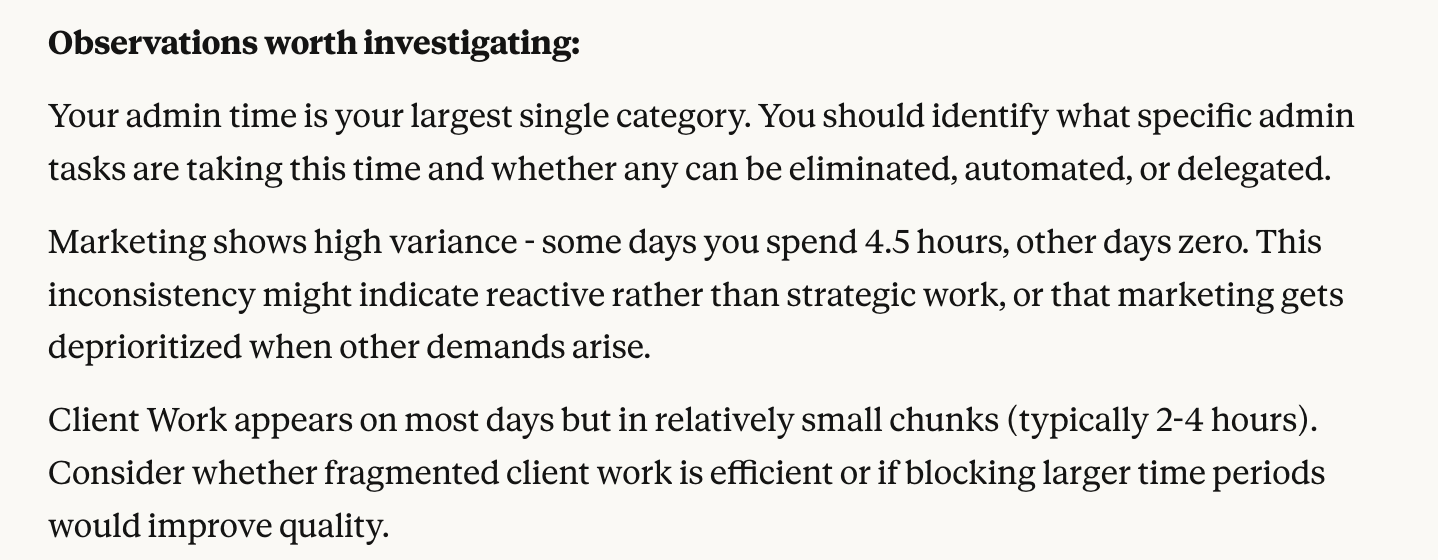
Insights from my audit
Next, you have two options to actually create the Skill, we’ll start with:
The Simple Way
Prompt Claude to create one for you.
Prompt: "I've completed a time audit of my work, create a custom skill that helps me work more efficiently in my biggest time drain areas. Here's my time breakdown: [paste your time tracking data, link to the Sheet file, add a screenshot or your own summary]”
Claude will now do all the work for you! It will write the skill according to current specs, and provide you with a Skill.md file for you to download. Make sure you name it with the term you want to use to invoke it (for example: name-skill.md)Download the name-skill.md file that Claude creates to your desktop.
In Claude go to Settings -> Capabilities -> Skills (scroll down) -> Upload Skill -> then, upload the name-skill.md file that you downloaded.
Enable the skill by clicking the radio button.
Test it out!
NOTE: You’ll need a Claude Pro Plan to enable the Skill’s capability, which as of late 2025 is $20/month. I’ve found it to be one of my most cost-effective and efficient employees! Also, because things change so quickly with AI, (they’ve already updated it a few times in the past week), you can always find the most current steps to create your Skills here.

30X40’s Design Services Proposal Template (a great use case!)
The second way is be much more specific with your prompting. Better prompts = better results. For that method, you can follow this template:
the better way
Copy the text below replacing the brackets with your own details. Then paste it into a new chat Claude.
Prompt to Claude: Help me create a Skill called "[Skill Name]" that [describe the specific task or outcome you want this Skill to handle].
Skill Purpose: [Describe what this Skill should accomplish in a few sentences.]
[Goal 1]
[Goal 2]
[Goal 3]
When to Use This Skill: Use this Skill when I need to:
[Situation 1]
[Situation 2]
[Situation 3]
Required Inputs: Ask me for:
[Input 1 — e.g., meeting notes, client brief, time logs]
[Input 2 — e.g., project documents, spreadsheets, emails]
[Input 3 — if needed, describe any contextual info Claude needs each time]
Analysis or Action Process: For each session, follow these steps:
[Step 1 — e.g., summarize, analyze, extract key points]
[Step 2 — e.g., identify issues, compare against baseline, flag trends]
[Step 3 — e.g., organize insights or recommend next actions]
(Add or remove steps as needed.)
Output Format: Provide results in this structure: [Choose an output format that fits the way you actually use the results—whether that’s reviewing them in Notion, sharing them with a client, or pasting them into a project report. You can also upload documents to use as templates like a spec, RFI response template, meeting notes document, or a spreadsheet.]
Tip: When you’re creating your Skill in Claude, you can specify the output structure in plain language. Try prompts like:
“Format this as a three-column table with decision, status, and next action.”
”Write the output as a short narrative summary followed by a checklist of tasks.”
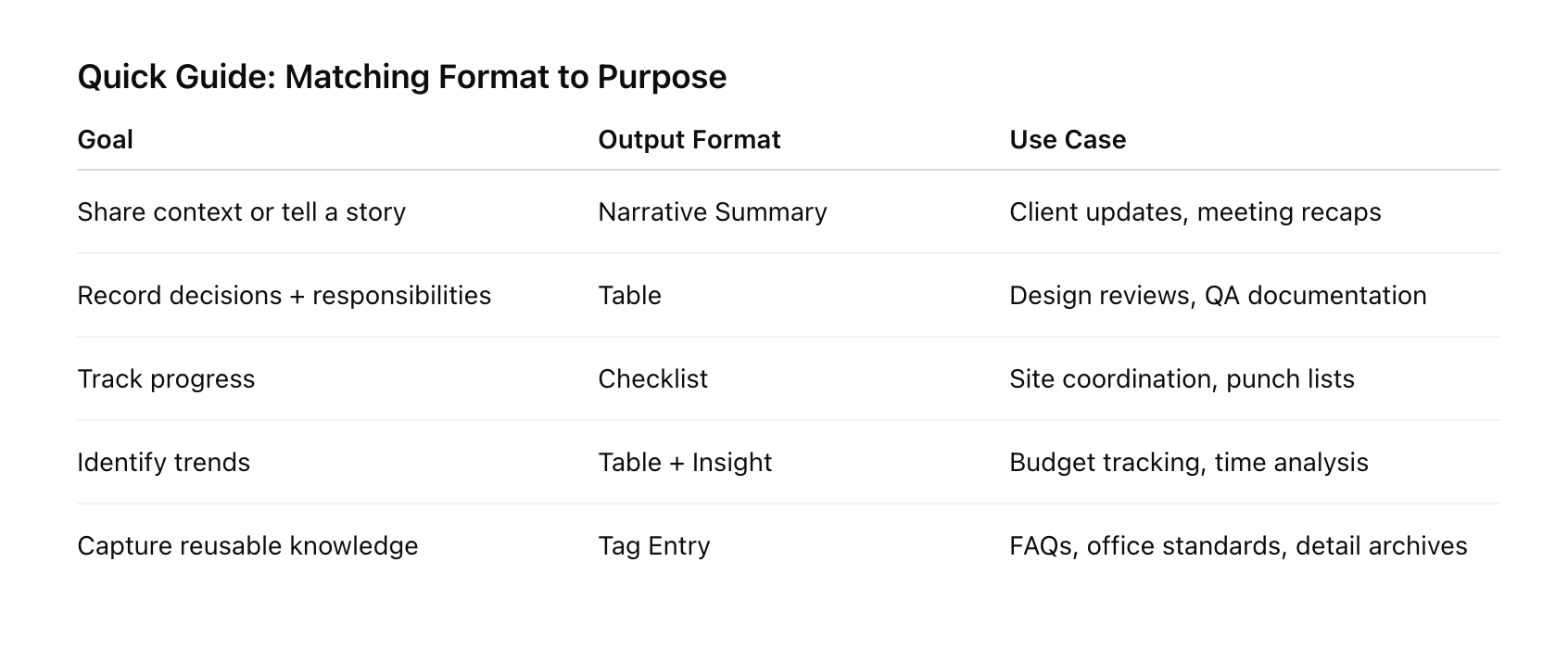
Some of the output format options in Claude (if you’re unsure of what you want, upload a file and ask it to define the structure)
Guidelines:
Focus on [accuracy / clarity / speed / relevance].
Always use my terminology as used in the inputs.
If data is missing or unclear, note it instead of guessing.
Keep outputs concise and formatted for quick review.
Create this Skill so I can [desired outcome—e.g., make faster project decisions, manage scope proactively, maintain clearer documentation].
Supercharge It With Connectors
Once you’ve mastered the basics, you can extend the connectivity with other tools you use in your daily practice. If you work in Notion, Google Drive, or Sheets, Claude’s Connectors let your Skills pull files directly from those sources:
Fetch meeting transcripts from Drive.
Grab project details from Notion pages.
Analyze timesheet data or financials from Google Sheets.
Create new specs from a template in Drive.
Once you begin using these, you’ll see opportunities everywhere and each Skill becomes a living extension of your studio ecosystem without wasting time copying and pasting documents.
More Ideas
I’ll close with two more ideas I’ve been working on: a business coach + a life coach skill. Here's how it might work:
Core function: Acts as your accountability partner and strategic advisor by asking the questions a good coach would ask, applying frameworks I've found useful, and tracking progress over time.
What makes it different from just chatting with Claude:
Stores my specific goals, values, and decision-making criteria in references
Knows my patterns from past sessions (what I commit to vs. what I actually do)
Applies coaching methodologies I respond to (not generic advice)
Maintains continuity across sessions without me re-explaining context
Potential components:
Scripts:
Progress tracker that compares what I said I’d do vs. what happened
Pattern analyzer that identifies recurring obstacles or excuses
Goal alignment checker that tests decisions against my stated priorities
References:
My core values and how I’ve defined them
Past coaching sessions with insights that emerged
Specific frameworks I use (how I evaluate opportunities, my decision criteria, my definition of success)
Questions that have been most valuable for me in the past
Assets:
Templates for quarterly reviews, weekly planning, decision logs
Reflection prompts tailored to my growth areas
How it would operate: You start a chat, the skill loads your context (current goals, recent commitments, known patterns), then facilitates a coaching conversation. Instead of Claude responding generically, it asks questions based on what has worked for you historically and holds you accountable to what you've said matters.
Example interaction: "Last week you committed to prospecting for 5 hours. Your time audit shows 1.5 hours on marketing. This is the third week you've undershot this goal. What's actually preventing this - capacity, motivation, or is the goal misaligned with your real priorities?"
The skill would know to ask that because it tracked your commitment, has access to your time data, and knows your pattern of setting goals you don't hit.
Would this replace a human coach? No. But it would give you on-demand access to structured reflection using your own frameworks whenever you need it.